Optimizing your Splunk SOAR deployment with JupiterOne

You’ve probably already heard about our recent partnership announcement with Splunk. (Wait, you haven’t? Well, check it out here!)
So by now, you should know that you can bring your JupiterOne data into your Splunk® Cloud Platform or Splunk® Enterprise deployment by downloading the new JupiterOne Add-on for Splunk, which powers the integration, and the JupiterOne App for Splunk, which provides a dashboard to visualize the results. Both the Add-On and App are available in Splunk’s app marketplace, Splunkbase™.
But that was just the beginning. JupiterOne and Splunk are building on their partnership to provide additional ways to help our joint customers combine structural (configurations and correlation with JupiterOne) and situational elements (events and activity with Splunk) to optimize their security operations. This time, JupiterOne has completed the integration with Splunk’s security orchestration, automation, and response (SOAR) system, Splunk® SOAR.
Visibility is everything in automation
Automation has revolutionized every major industry to allow teams to scale, companies to save, and revenues to grow. But it would be a completely different story if instead of accelerating productivity, automation were to yield a faulty output over and over.
For automation to be relied on blindly by the organizations that invest in the technology, it needs to be programmed with precision to have complete visibility and understanding of everything it is doing on behalf of a human. Any mistake in the programming can severely affect the quality of the production. The same applies to automation in cybersecurity.
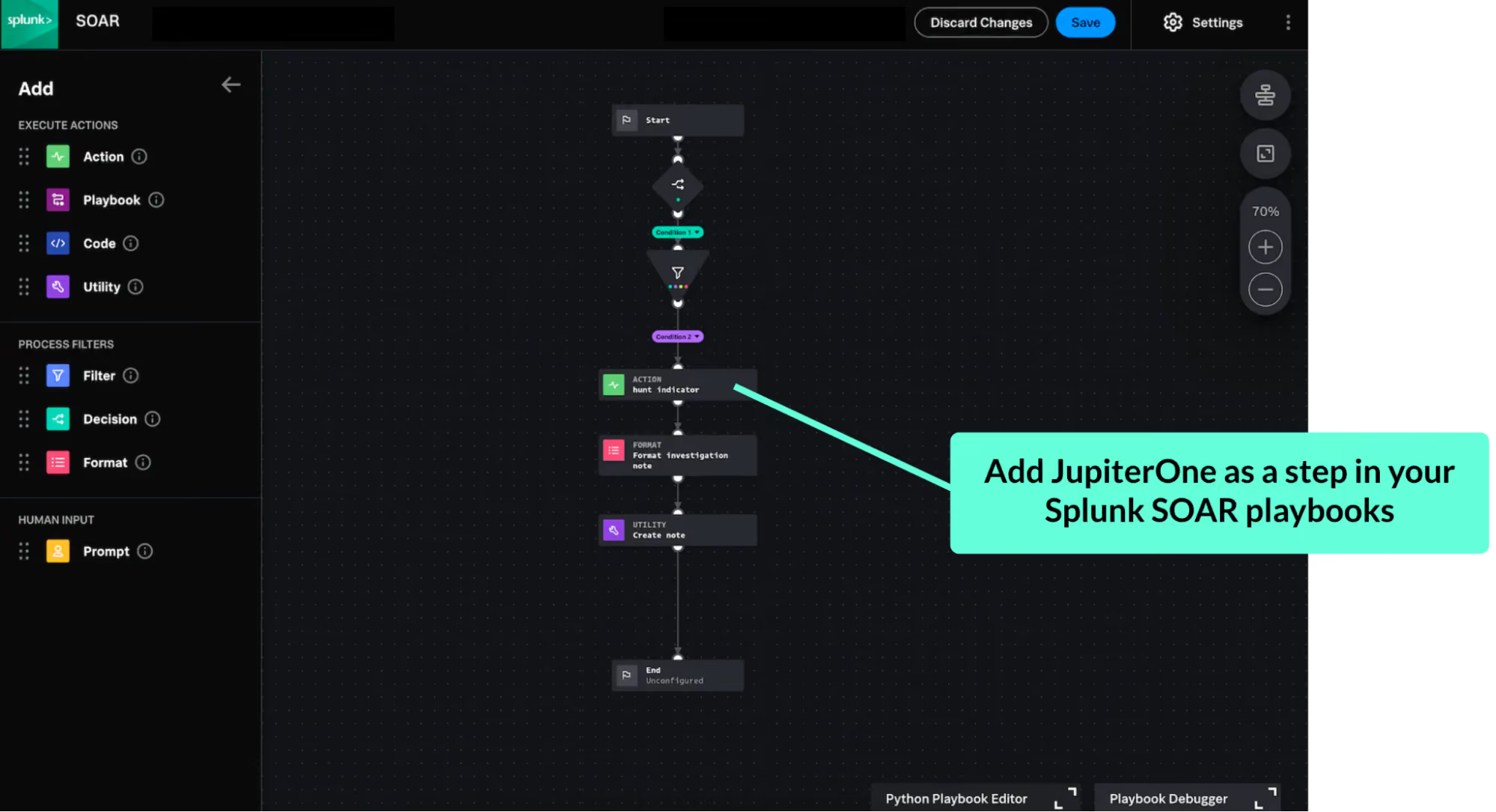
Splunk SOAR lets you orchestrate security workflows and automate tasks by delivering “instructions” to each tool you integrate it with. It is designed to make decisions for you based on programmed scenarios or “playbooks” that execute on actions like ingesting data and alerts from one tool, checking for specific indicators in the data, and triggering remediation actions on another tool. But if the data that it is relying on to trigger these behaviors isn’t thorough enough to ensure you have looked everywhere, then your level of confidence starts to quickly drop. That’s why you need JupiterOne.
Eliminating blind spots with complete cyber asset visibility
By adding JupiterOne as a step in your Splunk SOAR playbooks, you are extending the reach of your automated security investigations to include the depth and breadth of cyber asset visibility that you get with our platform. Leave no stone unturned by having Splunk SOAR automatically hunt for indicators across all your visible cyber asset data. That way, you can rest assured that Splunk SOAR will take thorough, automated actions based on the source of data.
The research JupiterOne conducted for the 2022 State of Cyber Assets Report (SCAR) found that the average security team is responsible for 165,633 cyber assets, including:
- 28,872 cloud hosts
- 12,407 network interfaces
- 55 applications per human employee
- 59,971 data assets (including 3,027 secrets)
- 35,018 user assets
That means that without JupiterOne, you could be blind to about 165,633 assets. Your next security breach could be hiding in one of them.
JupiterOne collects more asset data than any other vendor on the market, going beyond endpoints, IP addresses, users, and devices, to also ingest and aggregate data from CSPs, SaaS apps, code repos, IAM policies, security controls, vulnerability findings, and more. It then correlates all of this data to uncover relationships between assets and generate new finds. With JupiterOne’s complete inventory of all your cyber assets, and additional context about them, you’re enabling your Splunk SOAR deployment to perform at its best.
Want to learn more? Check out the JupiterOne app for Splunk SOAR in Splunkbase or request a demo to speak with a JupiterOne representative today.
Splunk and Splunkbase are trademarks or registered trademarks of Splunk Inc. in the United States and other countries.