The LastPass Breach: Using JupiterOne to prioritize which users you need to focus on
The recent LastPass breach resulted in the theft of its customers’ encrypted password vault. If you are a LastPass customer, the only thing standing between the attacker and your decrypted password vault is the strength of your master password.
For those with Enterprise LastPass accounts, it would be helpful to know which users have weaker master passwords. We can find that out easily using JupiterOne:
According to LastPass, the strength of the master password is scored from 0-100% in increments of 25% with 100% being “Very strong.”
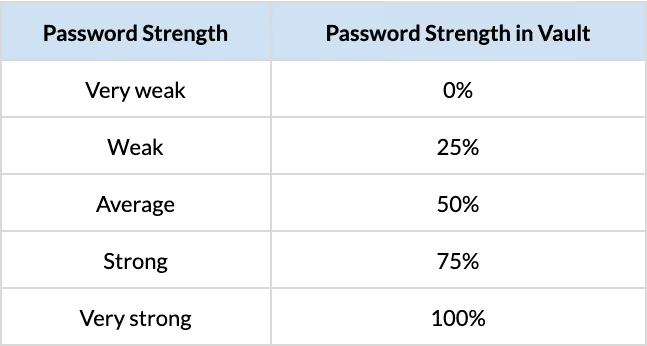
Anyone with a strength score of 50% or below should probably be advised to change the passwords for *ALL* their accounts in their vault, since changing the master password or deleting the LastPass account won’t address the breach concern. The attackers still have the password vault encrypted with your old weak master password.
For some users who have been actively using LastPass, this can be very time consuming, but better to be proactive here rather than reactive once the attackers break into your password vault.

For those with a score of 75%, even though it is considered “Strong,” under the current circumstances, we may want to take additional precautions and proactively consider who we may want to ask to change passwords in their entire vault.
To that end, I chose to prioritize those users with access to our source code. I can adjust the JupiterOne query above to show me those who have access to our source code repositories and also have weak master passwords.
We can further reduce noise and prioritize to users who actually contribute to code, filtering out other GitHub users:
At this point, for those with weak master passwords, it’s a race to make the contents of your vault outdated and therefore useless to the attacker. I encourage everyone to keep using a password manager, but let’s also hope that one day, we won’t need passwords at all.