PHP2Shell: A Practical Guide to Scoping Your Response
On October 21, 2026, the PHP project released fixes for two critical vulnerabilities in its core engine. PHP underpins a large share of the web, including WordPress, Drupal, Joomla and Magento, so many security teams are now working through the same task: confirming where PHP runs in their environment and deciding the order in which to update it.
The fix itself is a standard runtime upgrade. The part that takes time is scoping it. This post summarizes what is known so far, outlines a measured response, and describes how asset relationship context can help teams prioritize.
What we know
CVE-2026-109618 and CVE-2026-109619, referred to as PHP2Shell, are memory-safety bugs in how PHP cleans up after a request fails partway through. As Cloudflare's analysis explains, a crafted HTTP request can leave stale data in a PHP worker that a later request can then exploit.
The details most relevant to scoping:
- Affected versions: PHP 5.4 and later. Fixes are in PHP 8.5.12, 8.4.27, 8.3.36 and 8.2.35; older branches depend on Linux distribution backports.
- Location: The flaws are in the PHP runtime, below the application. Updating a CMS or its plugins does not address them.
- Impact: Remote code execution, and disclosure of worker memory that may contain credentials or tokens.
- Mitigations: Major CDN and WAF providers deployed rules before disclosure, and Cloudflare has reported exploitation attempts. Both CVEs are listed in VulnCheck's Known Exploited Vulnerabilities catalog. SANS has published interim configuration guidance.
For full technical detail, see the PHP advisory and the NVD entries linked above.
Scoping is most of the work
Runtime-level vulnerabilities tend to follow a familiar pattern: the update is simple, but confirming every place it applies takes longer. PHP often runs in places an asset inventory does not record as "PHP":
- Marketing or campaign sites on separate hosting
- Container base images
- Admin consoles of appliances and commercial tools
- Older VMs on PHP 7.x, which will not receive an upstream fix
- Vendor and SaaS platforms
Each security tool usually covers part of that list. Scanners see the hosts they are pointed at, CSPM tools see cloud workloads, EDR sees endpoints with agents, and DNS shows what is published. Combining those views is typically the first step.
Prioritization is the second. Every instance carries the same severity score, so CVSS does not help order the work. Exposure does: whether a host is internet-facing, which identities it runs as, and what those identities can access.
Because one of the flaws can disclose memory, teams may also want to review credentials on internet-facing hosts that ran unpatched, as a precaution.
A measured response sequence
The sequence below draws on published guidance from PHP, SANS, Cloudflare and the original researchers. It applies regardless of which tools a team uses.
- Inventory every PHP instance, starting with anything internet-facing. Include containers, appliances and hosting you don't operate directly.
- Patch the internet-facing tier first. Upgrade to a fixed PHP release or your distribution's backported package. For managed hosting, get written confirmation from the provider.
- Use interim mitigations where an update has to wait. Keep WAF managed rules in block mode, set session.upload_progress.enabled = Off, and cap request and upload sizes. These are partial mitigations, not fixes.
- Review secrets on exposed hosts. Consider rotating credentials, API keys, session secrets and certificates on hosts that were reachable while unpatched.
- Review logs for indicators. Researchers suggest checking for new files in web roots, unusual multipart POSTs followed by memory errors or bursts of HTTP 500s, and malformed PHPSESSID cookies.
- Check with vendors. Confirm update status with vendors that host sensitive data.
- Follow through on the long tail. Rebuild container images, retire PHP 7.x and older, and give every PHP asset an owner.
How JupiterOne can help
JupiterOne does not patch PHP or filter traffic; scanners, WAFs and deployment pipelines do that. It helps with the scoping and prioritization steps above.
Finding instances. JupiterOne brings asset and finding data from 200+ integrations, including cloud accounts, vulnerability scanners, EDR, container registries and code repositories, into one graph. PHP2Shell findings from existing scanners appear alongside cloud, identity and ownership data, so a single J1QL query can list affected hosts, containers and repositories.
Ordering the work. Because assets are stored with their relationships, teams can see which affected hosts are internet-facing, which roles they assume, and what data those roles can reach.
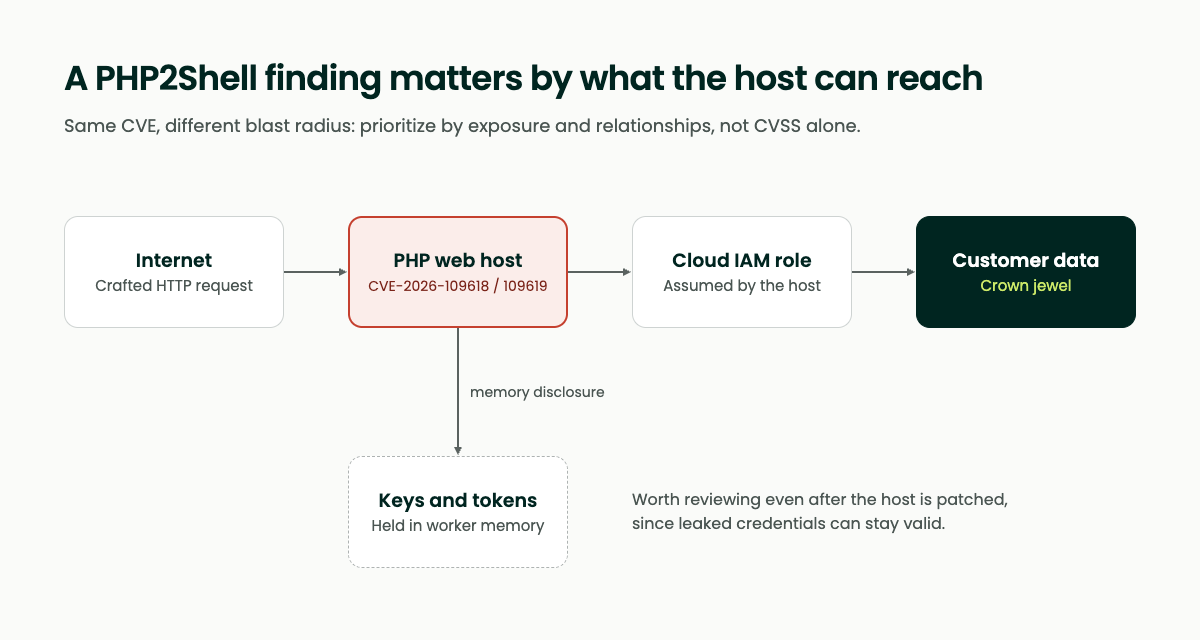
In this example, the same finding on an isolated host has limited reach. On a public host with a privileged role, it connects to customer data and to credentials worth reviewing, which makes it a reasonable place to start.
Scoping credential review. The same relationships show which service accounts and keys are associated with exposed hosts.
Tracking progress. Saved queries update as integrations sync, and a dashboard can show remaining instances by exposure and owner. Teams using Continuous Controls Monitoring can also track a patch-window control against live asset data.
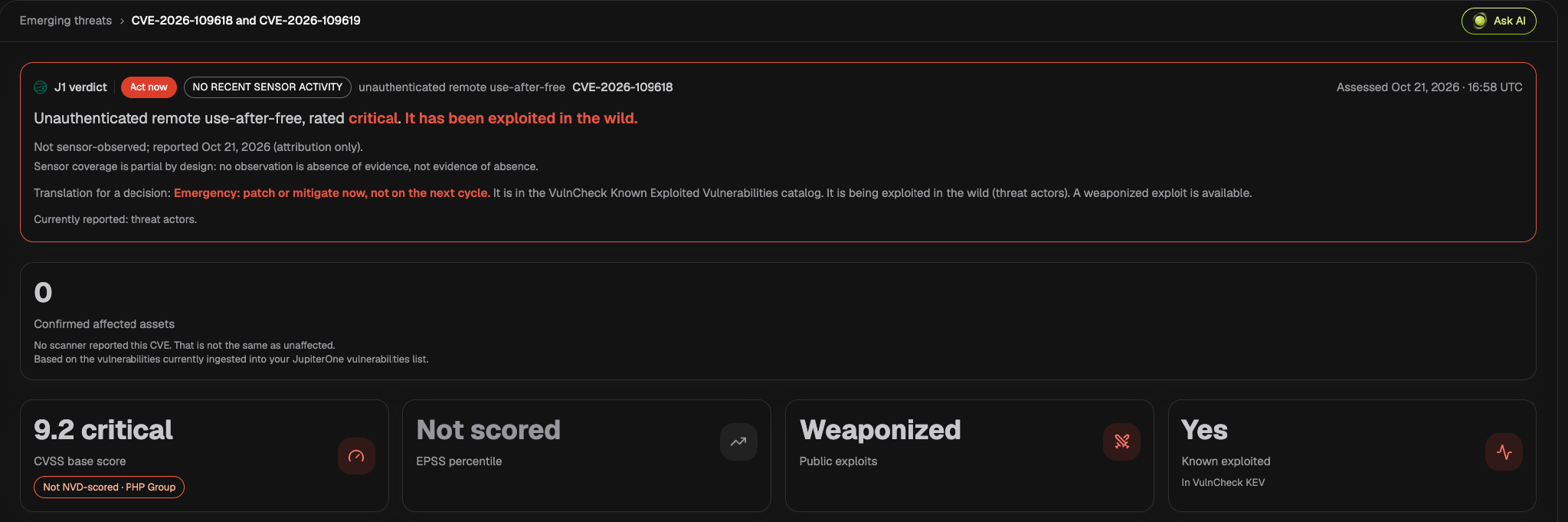
Context in one place. JupiterOne's Emerging Threats feed already covers both CVEs. Each entry pulls the exploitation evidence together (CVSS score and its source, EPSS, public exploit status and known-exploited listings) and translates it into a remediation verdict. It also shows how many affected assets your ingested scanner data confirms, and is explicit that zero confirmed assets is not the same as unaffected: a scanner can only report what it scans, which is why the inventory step comes first.
Looking ahead
Runtime vulnerabilities like this one are a reminder that a current asset inventory, with context about how assets connect, shortens every response. The steps above are useful whichever tools a team uses.
If you would like to see how JupiterOne approaches this, we are happy to walk through it.